Creating Your WordPress Theme – Part 1
Over the past few months I’ve gotten a lot of comments, tweets, and emails about how I create the layout/design here at OSN.
So I figure I will attempt to create a basic tutorial on how to create a 3-column design with a 3-column footer. We will be using CSS and XHTML strict coding because that is what comes easiest to me. Along the way I will mention plugins and little ideas that I tend to use frequently in my designs!
This is part one in the weekly series, where I go over the programs you may need, the color scheme I will be using, and the font I will be using.
So It Begins
Since the files have the .php extension you will need a text editor that is NOT notepad. I personally use and recommend the free EditPad Lite.
The files we will be creating for a basic theme:
- 404.php
- archive.php
- comments.php
- footer.php
- functions.php
- header.php
- index.php
- page.php
- search.php
- sidebar.php
- single.php
- style.css
I always start with the design FIRST before breaking it into code and style. I highly suggest figuring out your color scheme. Helpful sites for that would be Adobe Kuler and ColourLovers.
Here is our palette for the purpose of this tutorial:
I chose these colors because it reminds me of the sky, plants, and earth. Oh and because they are pretty. Don’t judge!
We will also be using the font Learning Curve both in solid and dashed forms. To use this font we will be utilizing the WP plugin, WP-cufon.
At the end of it all, hopefully we will all manage to create a wonderful design!
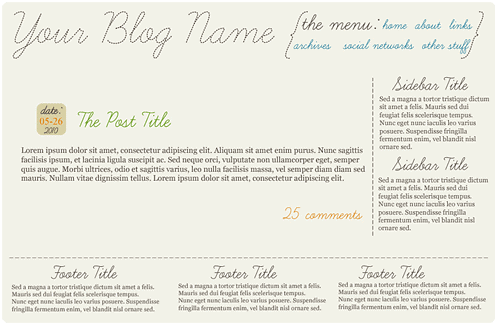
THIS is what we hope to create!
If you have any questions you would like to see addressed, let me know so I can include them in next weeks post or get an answer right away by asking on the [forum] or Q&A areas of OSN!
This post is over a year old which means the content may be outdated or no longer accurate.





Totally looking forward to this one!
Yay thank you!
Sarah – As always, your blog is amazing. I will be looking forward to this tutorial, as I’ve been thinking about making a move to wordpress.
Thanks!
Danielle
Aww thank you so much! If you ever need help moving to WP, let me know!
Cool. MAYBE this will inspire me to do my own theme, but I highly doubt it. :) I hate design and don’t have the time to work on it. :(
Thanks for the tip about WP-Cufon, I wasn’t really sure what that was all about before.
Awesomesauce! I just implemented Cufon on my site. Easy peasy! Now I just have to go find some free fonts that I want to use. :)
So I also learned about the TTFTitles plugin from you and I love that. Do you still use it? If so, how do you decide when you’re going to use which implementation?
Also, I use Notepad all the time for .php files. Crude, yes, but sometimes it’s all I have. It’s preferable to have something with line count in it, but not mandatory. Is that why you recommend not using Notepad, or another reason?
I no longer use the TTFTitles plugin as WP-Cufon is able to do so much more, I noticed the TTFTitles plugin, depending on the font, would cut off the lower half of characters, also it tends to run a very large cache which drove me nuts.
I don’t recommend Notepad mainly because it automatically converts everything to a text file instead of no extension or various other extensions like .html .php .asp, etc.
Having a line count doesn’t hurt either.
Hmm. I’ve never had a problem saving my flies as .php or .css when working in Notepad. Just choose “all files” from the type at the bottom and name accordingly.
Ah perhaps it’s that I’ve not used Notepad in over 6 years lol.
Also – I just replaced TTFTitles with Cufon too. Seemed pointless to use both. :)
Ooooh, I am so excited for this! :D
I’m glad! It should be fun at least!
YAY!! I’m excited to see how this goes and I’ll be following along :)
Yay awesome!!
look at you with your tutorials! What a great idea do to a series!
Thank you! Hopefully it helps someone lol.
I don’t think I’ll be creating my own theme, BUT understanding how this all works helps me in general when figuring out how to tweak my themes and just understand all this tech stuff in general.
Thanks so much–you rock!
Oh yes! Just knowing how to do minor adjustments to a pre-made theme is SO helpful!!
This is great!!! I desperately need this. I’ll look up the links and get ready to follow along.
Sweet! I will try and make sure I share all the wee links and plugins I find useful along the way!
I’m so unbelievably excited about this series! It’s obvious that I need the help. Maybe I can finally stop bugging you! lol
Thanks for stopping by and commenting on my Curious George post. He’s one crazy monkey, isn’t he? lol Have a great day Sarah.
LOL you don’t bug me! Hopefully I can be somewhat useful!
Woah. This is epic… I totally am going to follow these entries one by one and hope this helps in creating my very first, own made WP theme. Thank you very much for putting this together. I’m glad that I stumbled upon your blog!!!!
Yay! Hopefully by the end of the series everyone will have learned a bit on how to create a personal theme instead of using a pre-made!
That is great information and you blog is so cool!
Happy SITS Saturday Sharefest to you. I am going to go and make my “Best Of” page. Hope you and yours have a wonderful weekend.
Aww thank you so much!!! I really should make a “Best of” page too but I have no idea what content of mine is worth the title of “best” lol.
Very cool! I love your choice of colors. I think I just might give this tutorial a try. Thanks so much for sharing! Peace. :)
SITS visiting & blog following.
Yay! I can’t wait to see everyones results at the end of the series!
Thank you for this Sarah! I had installed Cufon but still confuse of how to use the font just for a drop cap on the blog entries. Will play around with it more :D
Oh I will touch on the drop cap once we get to the index.php portion of the tutorial series!
YAY I can’t wait! Thank you for doing this! :D
Oh I am really looking forward to reading the rest of this series! I am DYING to learn how to create in CSS/XHTML. Blogger was easy, but WordPress is prettier and I want to know how! Thanks for the tutorial!