How I Made a Facebook Landing Page
Go check out the awesomeness of my Facebook Fan Page. Seriously. I dare you.
I bet you totally want to learn to do it right? Right!
Now there are plenty of other tutorials out there but generally, I’m not fond of them. Overall they suggest creating a single boring graphic, it doesn’t help you link to your other outlets like [twitter] for example. A graphic is PRETTY but I’m all about connecting with links.
Now, I am going to assume you already have a facebook fan page (and you really should go and make a vanity URL just make sure 25 people are “liking” you!).
How to add the Static FBML application to your page
- Make sure you are logged into facebook
- Go to the Static FBML page
- Click “Add to my Page”
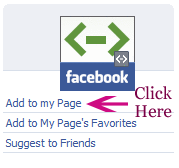
- A lovely window should pop up with all the pages you are an Admin of. Click “Add to Page” next to the page you want to make awesome.
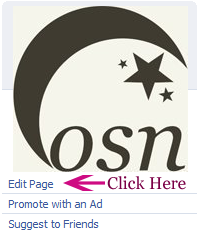
- Go to your FB fan page and click “Edit Page”
- Go down to the Applications section until you see the FBML area
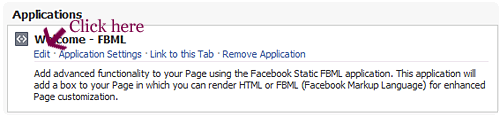
- Change the box title to something short and sweet.Put all of your glorious HTML into the box.
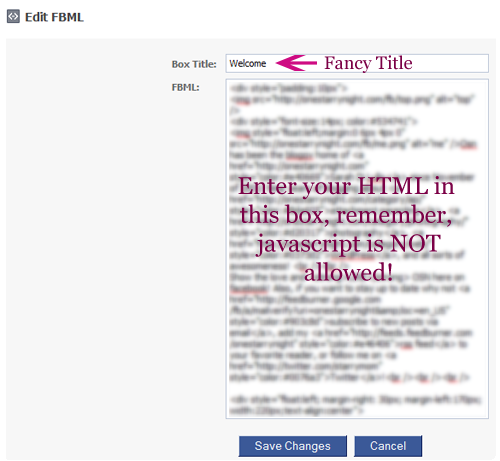
- Go to your FB fan page and click “Edit Page”
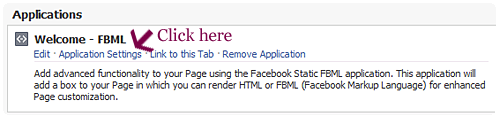
- Go down to the Applications section until you see the FBML area and click “Application Settings”
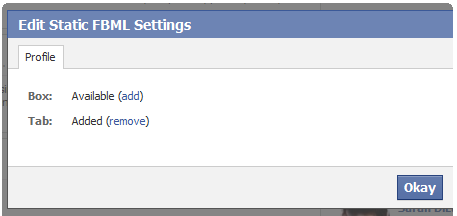
- A box will pop up asking if you want this new “page” to be a box or tab. We want it to be a tab.
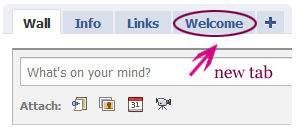
- Look, you have a new tab! Click it and make sure your HTML is correct, everything looks and works the way you want it, etc.
- Now, we want to make this new tab the FIRST thing a new visitor will see, and hopefully they will be so amazed by your awesome creativity that they will “like” you!
Go to your FB fan page and click “Edit Page”
- Go down to under
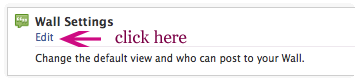
- There’s a ton of settings but the only one we care about right now is “Default Landing Tab”
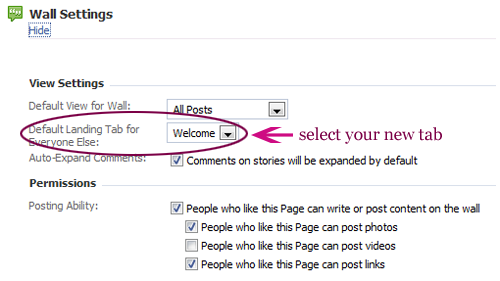









I know it looks like a lot of steps but really, it’s quite easy! The hard part is figuring out what you WANT on your landing page!
To help, here’s mine up for grabs! Download my FB Landing Page!
Now, in the comments, share YOUR Facebook Fan Page! Landing page or not, I want to become YOUR fan as well!
If you have any questions, need help, whatever it may be, feel free to ask!
This post is over a year old which means the content may be outdated or no longer accurate.





What a great tutorial, and I love your landing page!
Here’s mine:
http://www.facebook.com/HoboMamaBlog?v=app_4949752878&ref=ts
My tutorial (http://www.laurenwayne.com/2010/03/create-facebook-landing-page-for-new.html) was more about WHY to make one, because I’m lazy. ;) I really like your step-by-step instructions with screen shots. Looks very helpful.
I will have to add your tutorial and link to my tutorial. But keep in mind that I seriously am lazy, so it might take awhile…
Love your page so pretty had to become a fan ;)
Thank you! I may expand on it in the future but for now, it works!
Love how you made sure to not “just” have a graphic but incorporate links, it drives me insane to see a landing page that MENTIONS twitter, their blog, whatever but then I have to hunt it down which takes time and I give up lol.
Great tutorial :) Would try this but my website is off the radar on facebook due to offline friends that I don’t want to find my own website :)
Thank you! Aww well hopefully you will make a fan page in the future!
AWESOME Tutorial Sarah!! I’m going to have to implement this on my photo business page. Yours is gorgeous, om nom nom!
YAY thank you! You need to link to your photo page so I can take a look!
Great tutorial girl, and I like your page. It looks so purrty! Love what you did! Will try to tweak mine and come back to show you the end result :D Fingers crossed.
Yours is so pretty, Sarah! I totally love it. Here’s what mine looks like: What do you think? I wish I can make a prettier header :D
LOVE IT! Omgosh you need to go make your vanity URL asap!
Thanks Sarah! There’s no way I could do it without your tutorial. Now, what is a vanity URL?
So that your fan page URL is like facebook.com/you rather than a bunch of numbers and such!
http://www.facebook.com/username/
This is great! I’m going to try this out for my page. It’ll be a little while though, I’m trying to redesign my site.
OHH can’t wait to see the redesign!
Very nice. I made one the other day using Problogger’s tutorial, which is rather similar to this one. I LOVE your landing page! I haven’t had a lot of time to work on mine, so it’s just a couple of graphics strung together.
Great way to personalize the tutorial and bring it to your audience. :)
Yep I saw ProBloggers and Blogging w/Amy’s after I posted this. I wish I had a fancier SHORTER way of going about it to be a bit more unique… I like to think my purple circles are fancier LOL.
Thank you so much!
I love it Sarah! I want one too! I’m going to have to follow your tutorial as soon as I can find time to do it. But great job!!
Yay thank you so very much Uyen!!
here’s mine http://www.facebook.com/carrieactually?v=app_4949752878 i emphasized links as well. my only problem was i couldn’t figure out how to make the font larger but now that i see your code i see i need to put the html on every line not just at the top
It doesn’t need to be every line, I just wanted pretty colors lol, however it DOES need to be defined in a div style for sure. Also yes, MAXIMIZE the space you have, I won’t be able to tell for a few weeks if my landing page will improve “turn over rate” if you will.
I don’t know crap about crap but I am so looking forward to sitting down with your tutorials sometime this summer during my glorious baby whisperer hours o’ freedom.
LOL love it!
Wow- that’s serious AWESOMENESS! I haven’t yet created a FB Fan page but it’s on my to-do list. I know from my work in marketing though how important landing pages are and you’ve nailed it! Thanks for the step-by-step… I’ll definitely be referencing it!
Thank you so much!!
This is wonderful! Thank you! I am definitely going to have to implement it on my book blog’s fan page: http://www.facebook.com/ReadAllOverReviews
YAY can’t wait to see it!
Haven’t done this yet…haven’t even joined twitter yet…so much to do…so little time…but thanks for the tips. Bookmarking this page and subscribing to your blog!
:-)
Thank you Katie!
I’ve gotta tell you, I fell in love with your Welcome page the minute I saw it. I love that you’ve done a tutorial, but I’m worried that it’s totally beyond me. lol Therefore, I’m wondering how much you’ll charge to create a Welcome page. lol Seriously!
I know. I know. I’m a pain in the butt. Sorry.
Kristi, Live and Love…Out Loud
@TweetingMama
Thank you so much!!! Hmm that is a good question! I suppose it depends on how fancy it goes, probably a range from $20-40?
So I toyed around with it and every time I go to my page a “Welcome to your new Page. Let’s get started!” page shows up. I guess others aren’t seeing that. I haven’t done up my “Welcome” yet, so I stopped it from showing as default for now.
Yep as the admin you will see that page until you complete the steps it outlines basically.
Ahh so it’s like starting over in a sense.
Well that more so has to do with just creating a fan page from what I learned. Can’t wait to see what you come up with!
Thank you for this, Sarah! I’ve done a little with mine, and will add more pretties later.
BTW, for some reason mine will not have the landing page as the one I created. I can’t figure it out.
If I go to the main URL for your fan page, it directs me straight to the Howdy tab! You should create a vanity URL too!
I love the idea but I’m still learning about code and really want my little sentence even or side by side with my subscribe thing. Thanks so much for posting I like it anyways.
Thanks for commenting! I’m glad you found it somewhat useful!
FINALLY got mine done!
Sweet!! I “liked” your page too, awesome job!
I already told you how awesome your page was on FB but I have to say I loved your tutorial and it is so nice that you provided a free template for others to use!
My landing page is here: and is not really that fancy but I wanted something I could make quickly during my daughter’s nap, lol!!!
Awesome job! I “liked” it! I love the font you used!
Thanks for this post Sarah! I now have a Welcome page for my Facebook page. I’m not quite done with it, but it’ll do for now. :)
Oh yeah, here’s my Facebook page. !/pages/simplelittlejoys/224782543396
I already “Like” your FB page.
AWESOME! I love the font choices!
I’ve got the fanpage http://www.facebook.com/fromtracie
Now this weekend I need to follow your tutorial and make a kick-butt welcome page!
OHHH awesome! Now you need to make a landing page hehe!
Thank you for this informative post! I love your landing page!! You’re so right about it being most effective if it’s catchy AND functional.
I JUST launched my new blog this week. My fan page is very new so I haven’t tried making a landing page yet. I’ll give it a go by following your steps.
Here’s my page: http://facebook.com/prenatalcoach
OH sweet! Let me know when you get your landing page up!