How to Schedule Facebook Fan Page Updates
I love this new feature a lot because I can update my Facebook fan page for the morning crowd and night crowd, easily!
Once you’re on your Facebook Fan Page you’ll notice in the update box, a teeny clock icon.
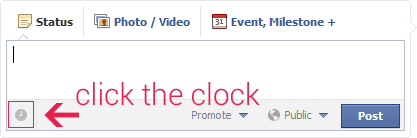
When you click the clock it MAY ask you to set the date of when you started your Facebook page. Otherwise it’ll show you a drop down for year, month, day, hour, and minute.
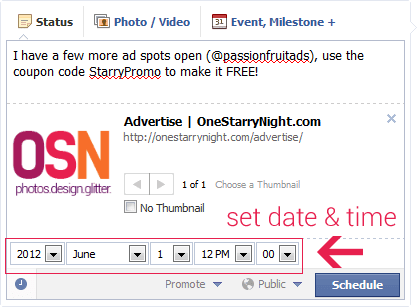
Once you’ve done that, click Schedule.
If you want to remove, edit, or just see your scheduled updates, you’ll need to navigate to your page’s activity log. MAKE SURE you’re logged in under your PERSONAL profile, NOT your Facebook Fan Page’s profile name because for some odd reason the activity log doesn’t work if you’re under the FB page name (I have to be logged in as Sarah Vincent NOT as OneStarryNight for this feature).


Hopefully this tiny tutorial helps! If you have problems or have any questions, please let me know.
This post is over a year old which means the content may be outdated or no longer accurate.







oh nifty!! :D didn’t know you could do that! shall have to try this out for myself hehe
Let me know how it works out for you!
Good to know! That will save me having to use HootSuite (which I hate) to schedule updates on my company’s fan page! Thanks!
I NEVER liked HootSuite! Let me know how this tutorial works out for you!
PERFECT. Thanks for this! :)
You are so very welcome!
Awesome!! Love this :)
Yay!
Thanks for sharing!! You’ve changed my FB life!
AWESOME!
THANKS for sharing!! Did not know this!!! Passing this post around now! THANKS!
Thank you so much!
Super smart and awesome. Thanks for the detailed tutorial!
Sweet! Thank you!
Thank you!
Aww you’re super welcome!
I don’t seem to have the “Manage” button on my admin page… is this because I have less than 30 likes, as I have just started by FB business page?
I really want to be able to schedule posts – it’ll make life sooo much easier!
This is great! Wow–I discovered to icons this week: the tiny magnifying glass on FB group pages to search posts and now this. Thank you!