WordPress Theme Download and Tidbits
First, we set up a plan on how we want our theme to look then we went ahead and created the style.css, this week I realized that it would take forever to get through this and decided to offer up the theme in it’s entirety as well as some code tidbits and such!
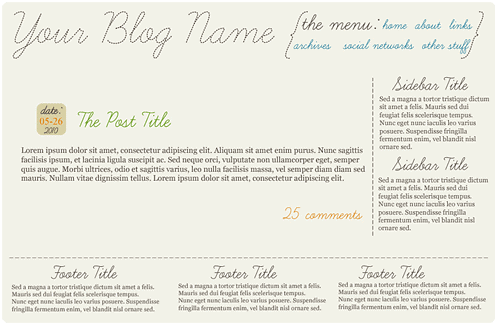

I can not guarantee that it will work perfectly or display perfectly for YOU on YOUR server, however it works fine for me, worked fine for a friend… so hopefully that’s good enough! Feel free to leave any questions you have on this entry pertaining to the theme. The Cufon javascript and font are all hardcoded into the theme and the files are included as well so you should be able to just upload, install, and activate the theme and be good to go.
Both the sidebar and footer are widgetized. The footer is 3-column so I suggest using only 3 widgets in that area.
Onto the Tidbits
Asked by BabyDickey:
- I want to know how to make my own personalized headings for everything in the sidebar!
- I use a pre-made wordpress theme. but i want to add a widget area.. at header and/or footer. no idea how!
For the personalized headings on the sidebar, I highly suggest the WP-Cufon plugin. Install it and activate it. You take the font, (check out DaFont for a ton of free fonts!), you want to use, pop on over to the Cufon Generator which creates a javascript file out of the font to be processed by the plugin. You will upload the font file to wp-content/plugins/fonts (you may need to create the fonts folder). Then in your WP dashboard go to appearance -> cufon. Once there it has directions on how to use it! If you have any further issues or it doesn’t work properly for you, just let me know and I will try to help anyone with issues!
For a new widget area, and I do this ALL the time when I do a 3-column footer, is edit your functions.php file in the theme you are using and add the following to it:
if ( function_exists('register_sidebar') )
register_sidebar(array('name'=>'footer sidebar',
'before_widget' => '<div class="floatleft">', // Removes <li>
'after_widget' => '</div>', // Removes </li>
'before_title' => '<h3>', // Replaces <h2>
'after_title' => '</h3>', // Replaces </h2>
));
Bam! Go to your widgets page in the dashboard and you will now see a new “sidebar” area! Now in your footer.php or sidebar.php file, add this bit of code to where you want the widgets to appear:
<?php if ( !function_exists('dynamic_sidebar') ||
 !dynamic_sidebar('footer sidebar') ) : ?>
<?php endif; ?>
Again, if you have any errors, questions, etc, just let me know!
Hopefully everyone enjoys the theme or at the very least learns something from it (by going over all the files and such) and the wee code bits!
This post is over a year old which means the content may be outdated or no longer accurate.







Another great post and it’s wonderful that you’ve zipped it up for us to play with and use. A great little series. Are you still planning to go through the individual pages? Not a problem if you’re not but you do explain things in a simple no fuss way. Once again thanks.
I was going to go through all the pages but 1. due to lack of questions 2. the inability to break EVERY LINE DOWN really wore on me. Hopefully just by EXPLORING the theme and even comparing it to OTHER themes out there, people can see how easy it CAN be!
Wow, you did a great job with the theme:) It looks great:)
Yay thank you Cecilie!!
This is so great and helpful! Thank you :)
Thank YOU so much!!
I quite like the idea of actually having stuff in your footer. However, I do worry that it is just going to be overlooked as people may not scroll down that far. Personally, I only scrolled down as far as your footer to see if your current layout was the same as the one you are giving away.
Generally my posts aren’t so long so the footer is MUCH more visible, I do think not all designs should have a footer with a lot of content if they have more than 5 posts on the main page.
I like the format! I always heard that WordPress was hard to navigate– you make it seem easy!
Aww thank you! WordPress IS EASY, it’s just a matter of breaking it down to it’s basic form to learn it!
Great stuff, Sarah! Have you thought of making WordPress themes to sell? Have you heard of Theme Forest? Not sure if you’re interested, but I’m sure you could make a very nice supplemental income by distributing WordPress themes!
Thank you so much! I’m not sure if I would do well selling themes, as it is, I am wondering if THIS theme that I’ve offered up is even functional for people lol. I guess I would have to see it in action for a few months lol.
Great job Sarah! You are seriously just all kinds of awesome. I love the theme. Well done!
Hope all’s well with you and the family. I keep missing you on Twitter. One of these days will be on at the same time again. Have a great day.
Kristi, Live and Love…Out Loud
@TweetingMama
Thank you! I’ve not been twitter active lately, blame the weather and AF lol.
What a fun and nice theme. I wish I would have found a free theme!
Thank you so much!
Thank you for sharing :)
You are very welcome!
The theme is so lovely. I’m interested in learning how to design my own themes. Do you have any suggestions as to where I should begin? I’m totally new to this, but find it to be very interesting, and seems like a wonderful creative outlet. Any good sites to go to that would benefit a total beginner like myself? Thanks. Peace. :)
Oh wow. very nifty theme :D I love it!!
I’m attempting to use the cufon plugin with a new font to change the sidebar titles in a Thesis template with no luck. I am unable to open the newly created font.js font file to verify that I have the correct name of the font file and can’t seem to get it to work. Any suggestions or tricks with Thesis 1.8?
There is nothing specific that needs to be done to have Cufon work with Thesis. I would suggest recreating the cufon font file, making a note of the name you give it. Then in the WP Dashboard – > Appearance -> WP-Cufon, following the directions.
ALSO you need to make sure you are using the correct CLASS NAME so that Cufon knows WHAT to change.
Otherwise I can do it LOL
Hey, how do you add a new folder in order to upload the fonts? I can’t figure it out.
You do it via FTP or your CPanel (control panel for your hosting account) file manager.