9 Ways To Make Your Blog Suck Less
I work on a lot of blogs, especially my own, and here are my tried and true tips to make YOUR blog suck less (although I’m sure your blog is utter perfection, still, couldn’t hurt!)!
Stop Using Dropdowns and Lists in Your Sidebar!
Almost everyone does it. They see a drop-down widget for categories in their dashboard and slap it into their sidebar thinking it will direct more traffic to love of kittens | kitteny love | I love kittens and instead it does nothing. No traffic. No acknowledgement. Certainly no extra page views! The problem is classic. When a person is presented with a lot of choices, their brain freezes up. So instead of making ANY choice, they just slowly back away and move on to the next blog.
I highly suggest that if you need it on your sidebar that you pick out the 3-5 categories you really want to direct attention to and link to those (and only those!) in your sidebar with a blurb on what the category is about.
This goes for those Archive and Tag drop-downs (and tag clouds) too, put that on a separate page already!
Use ONE Category / MANY Tags
Nothing can drive me more crazy than seeing a post be in 3-10 categories. If the content of your post isn’t specific enough to be in a SINGLE specific category, then either it shouldn’t be posted until you can edit it down to fit a specific category or you really need to rework your category system.
Life. Thoughts. Thinking. Tidbit. Everyday.
It’s all the same thing! Select one category and drill it down using tags. A great example would be a Wordless Wednesday post. The category could be Photography and the tags could then drill it down into specifics such as flowers, children, internet meme, fluffy kittens of doom, and so on.
Social Media Button Overload
You know those blogs… the ones that have 6+ LARGE social media buttons on every post, top and bottom, including excerpts? No? Here’s an example!
I personally have only the small version of both the twitter button and facebook like button on my main home page and then I have a special area on the single post / comments page with the larger buttons.
I recommend either using a plugin (I suggest Sociable) or hard-coding them into your theme if you have that option and do not have ANY social sharing buttons on excerpts, it’s too much clutter, keep them to full posts only.
Get Rid of <CENTER>
I come across this on 80% of the blogs I work on. This tag is so outdated and can screw up your coding majorly. A quick replacement if you’re using WordPress would be to use the class aligncenter:
Example:
<div class="aligncenter">content here</div>
Or for use with an image:
<img src="image.jpg" alt="image" class="aligncenter" />
And that will achieve the same effect but in current and not so jacked up way!
Clear Your Floats
You know how you can come across a blog post that looks like this? Oh yes, I purposely screwed up my own coding to provide an example!
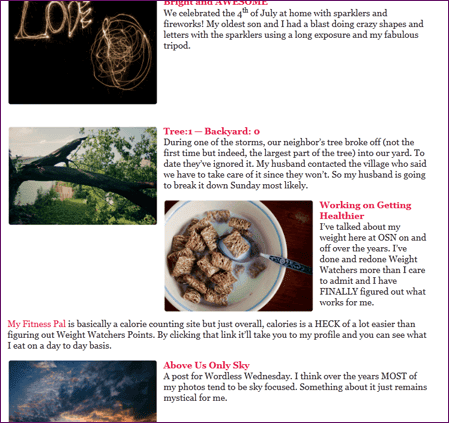
This can be fixed in one of two ways. The first would be to enclose each area with a P tag and give it a large padding so there is NO way the posts would be near each other and the second way (which I use the most often) is to clear the floats.
Example of using the paragraph tag:
<p style="padding-bottom:90px;">

<img src="https://onestarrynight.com/wp-content/uploads/2011/07/DSC_4277-300x199.png" alt="above us only sky" title="above us only sky" width="250" height="auto" class="alignright size-medium wp-image-8192" /> <strong><a href="https://onestarrynight.com/sky-3/">Above Us Only Sky</a></strong>

<br />

A post for Wordless Wednesday. I think over the years MOST of my photos tend to be sky focused. Something about it just remains mystical for me.

</p>
An example by clearing the floats:
<img src="https://onestarrynight.com/wp-content/uploads/2011/07/DSC_4277-300x199.png" alt="above us only sky" title="above us only sky" width="250" height="auto" class="alignright size-medium wp-image-8192" />

<strong><a href="https://onestarrynight.com/sky-3/">Above Us Only Sky</a></strong>

<br />

A post for Wordless Wednesday. I think over the years MOST of my photos tend to be sky focused. Something about it just remains mystical for me.

<br style="clear:both" />
By the way you can see the post itself to see how it’s not jacked up!
Personalize Your Twitter Sharing Plugin
I can tell you right now if I take the time to click that cute little “tweet me!” button on your site? It better have YOUR twitter handle attached to it! The biggest plugins I see with this issue would be AddThis, ShareThis, and AddToAny.
After installing and activating the plugin of your choice (or do what I do and hard-code them into your theme!) take the extra two minutes to go to the settings and slap in your twitter handle. No joke, you will ALWAYS have via @onestarrynight attached to every twitter button around this blog!
Get Rid of Partial RSS Feeds
I love RSS feeds. I’m able to read blogs on the go (or more often, in bed at 3am on my phone). I don’t have to do it like the old blogging days and manually go to every blog I’m interested in just to find out they haven’t updated in a month.
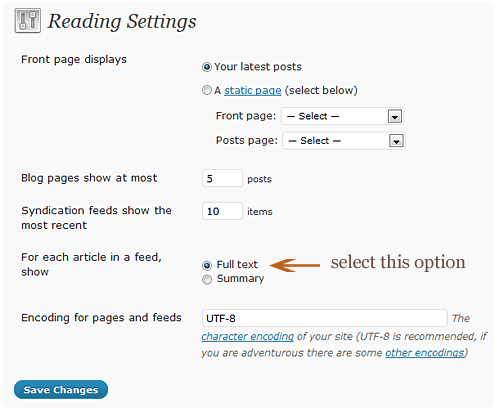
Granted, there will always be the debate between full vs partial RSS feeds. Overall most READERS prefer full feeds. Those who offer up only partial feeds tend to believe that it will encourage click-throughs… I feel it only encourages people to unsubscribe.
In your WP dashboard, navigate to settings -> reading and change them as such:
Fix Your Permalinks!
I bring this up every single time! Having a URL that ends like this: /?p748 or domain.com/2012/05/12/category/post-title is just crazy to me! There is no reason for the first one ever and the second is way too long and doesn’t need the date!
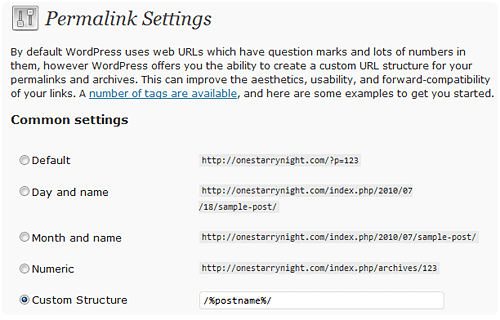
In WordPress it’s very simple to change how our permalinks look! I personally go with just the postname.
In your WP dashboard, navigate to settings -> permalinks and change them as such:
Most Importantly – Be Authentic!
I can’t stress this enough. To make your blog suck less, blog authentically! Don’t pretend to be someone else or lie about your life to just gain more readers. At the end of the day visitors can tell if you’re being an honest person or shady.
I can’t tell you how many times I’ve come across an awesome blog just to be disappointed to find out the blogger isn’t being truthful in their posts!
Always respond to comments and emails when you have time, don’t write for pity pageviews, and remember that without your visitors, your blog is just an online diary!
User Submitted
I asked on my facebook page and on my Twitter, @onestarrynight, and here is what other people had to say for things that can make a blog suck! Granted I 100% disagree about justifying text! I think it looks awful but I discovered some die-hards LOL!
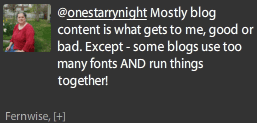
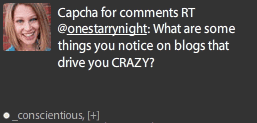
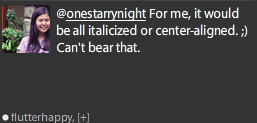
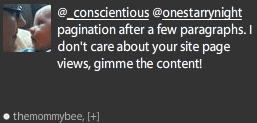






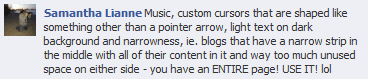

So there you go! 9 (and then some) ways your blog can suck less! I’d love it if you would share in the comments your favorite blog tip!
This post is over a year old which means the content may be outdated or no longer accurate.





Awesome post. It drives me crazy when I’m trying to tweet someone’s post and instead of their Twitter username, I see @addthis. And it’s such an easy fix!
Just wanted to add about the partial feeds: as a reader, I prefer full feeds too, but as a blogger, I ended up switching to partial because I was having major problems with content scrapers. A lot of the food bloggers I know have partial feeds for the same reason.
I am fascinated about the food blogger / partial feeds! I wasn’t aware that the problem was so bad!
I had been apending a link back to my blog in my feeds so I’d get a pingback anytime a scraper took my stuff. And I hardly ever got spammy pingbacks, so I figured we were all good w/ the full feed. Then back in December I was looking through my backlinks on Webmaster Tools and holy crap, my stuff was on SO many low-quality .info, .biz, etc. sites. Jerks.
ok, I think I’m one of the lame people, but I can’t find where to change the @addthis to my twitter name?? can you help??
On the settings page, click the “Advanced” tab and in the twitter template put the following:
check out {{title}} {{url}} (via @yourtwitterID)
I always come to your blog for blogging tips hehe.
LOL thank you!
I just always love the look of your blog and how easy it is to get around.
i know! mine always looks like a trainwreck up next to hers!
Thank you for the lovely tips. I hope some people will take a look and follow your advice.
I read blogs for a living, for instance I now will be reading yours, and the number of craptastic layouts are HUGE! Simplicity is a super good concept.
Thank you!
can’t stand it when i go to a blog and the text is all centered — seems like it happens more at blogspot than anywhere else, like with the diy and mommy blogs.
OHHHH yes, it’s like reading a weirdly shaped christmas tree lol!
rofl! yes it is!
Hmmmm….
I *might* be changing a thing or two right now… some of them I didn’t even know were set up that way! Thank you!
yeah me too. i had no idea drop downs and lists were problematic …
Nice tips! Love them. I can’t stand the 328473248327 category thing either. Or those ridiculously long links!
You might not like my categories though, well, I don’t know, I use parent categories and almost every post goes in a parent and child category. So “Design” as a parent and “Blog & Web Design” as a child. So technically I have a lot of categories, but I think they’re pretty well organized.
Maybe I’m dumb, but I installed Sociable and don’t see where to add my Twitter handle? Because I’d definitely prefer it with an @erinAKAeef but don’t see that option anywhere. =
Other tips:
Choose a style and stick to it, all your blog elements should work together!
Don’t use 384732984 fonts! Three at the most.
Your images should be the width of your blog post or right or left aligned, not stuck awkwardly in the center with a lot of space on each side.
Don’t blog just to blog, create quality content instead of fluff posts.
For Sociable it allows the option only for their Skyscraper version to customize the twitter handle!
Man, I kind of feel like I’ve made a whole heap of detrimental mistakes with my site now. Perhaps when I have some time I’ll have to do a wee revamp?
LOL I doubt you made any massive mistakes!
Oops. I’m guilty of most of those. Well, the drop downs and the millions of categories. But I use the categories as tags–when my posts transferred over from Live Journal, the tags turned into the categories, and I just kept them that way. When I get all the posts categorized, I might change them all to tags, then do the category drill down thing, but we’ll see. I have eight years of posts, so I dunno if that’ll actually come to fruition.
I have a few major categories on my top menu bar. ALL of them are in a drop down in my footer, as are my archives. They’re all mainly for *my* reference. If no one ever uses them, it’s no skin off my back. But I use them a lot to reference old pages or something.
And the ‘center’ tag is my friend! :) But I might start using the “div” tag instead, especially because the center tag acts differently in different browsers and themes. However, the “classalign=center” in the image tags …I cross post my posts to Live Journal and that classalign tag screws up all the things. So I use “center” because my page and LJ both seem to get it. But I hate that I have to type it every single time now. I think the div tag will help with that.
Partial RSS feeds drive me BANANAS. I don’t like being forced to go to a site. If I see something in my reader that I want to comment on, I will click thru anyway.
Music gets on my nerves. As does bad spelling and grammar, but I try not to hold that against bloggers unless they’re trying to make money or be professional. I’m a freaking editor and I make typos all the time, you know? And captchas in comments suck hot bootie.
oh totally on the music. if i go to a website that has embedded auto-play music and/or video, i hot tail it out of there and never go back. what a turn off — especially if there’s no way TO turn it off! :)
I know right?
That stuff was cool in 1997. Not anymore.
I’d suggest doing something like the following then for the div.
<div style="margin: 0 auto; position:relative; display: block;">content</div>Thanks. I’ll make note of it.
I agree wholeheartedly about partial RSS feeds – can’t stand ’em.
My top tip? “Give” generously to other bloggers. Leave comments on inspiring posts. Promote the projects of others on Facebook, Twitter, and Google+. “Like” Facebook pages of the writers you enjoy. Etc.
I 99% of the time will unsubscribe from a partial feed unless I REALLY REALLY REALLLLYYYYYYY love the blog lol!
okay so i have the “add to any” lockerz buttons plugin for wordpress. but i’m not finding anywhere to add a “via @mariadkins” link to the end of any of the shares. any clues?? i’m usually not webdumb these days, and i’ve looked all over. :/
On the settings page in the large Additional Options box, place the following:
var a2a_config = a2a_config || {};a2a_config.templates = {
twitter: "Reading: ${title} ${link} by @twitterid"
};
thank you! :)
This is probably the best list of blog tips I’ve seen. I think it’s important to learn a little about your coding and dig deeper than the usual annoyances of “white text on a black background” and “automatic music.” Thanks for putting this together! I’ve been putting off making a list of blog improvements. But can I ask what theme you use? Your site design in general makes me unbelievably happy!
Oh thank you! I design/code everything here at OSN, always have since I started in Nov of 2001 LOL! I’m not a fan of pre-made themes, they tend to look too… cookie-cutter for my liking and I also have control issues ha!
Well, my sidebar is cluttered but you’ve shown me the light. I loved this whole post.
LOL thank you!!
I like the “Permalink” tip but my custom structure did not only say /%permalink%/. It wasn’t clear in your tip that the blogger would have to edit that field themselves. I gave it a shot somewhat knowing that I might be able to but many less tech-savvy (and I am almost the bottom of the barrel. Ha, ha) might not know to do that and be confused.
That was something that always frustrated me but I didn’t know how to change it. Thanks.
My screenshot is outdated by two versions (WP has recently upgraded to 3.4), I believe it now offers a postname option in the Permalinks Settings option page. I took a look at your blog and it looks like you’re on version 3.2.1 which is vastly out of date (and is a security risk!).
Thanks. In reference to needing to update – as you can see by my comment I am not tech savvy. I am not sure how to update and I am afraid if I try that I will mess the whole thing up. I do know it needs to be done though.
Oh! Well to promote myself here for a moment, I do upgrades for WordPress for a flat-rate of $15. Also I know WP has a good tutorial here: http://codex.wordpress.org/Upgrading_WordPress_Extended
That’s ok, I don’t mind :) I will check out the tutorial and keep you in mind. I just went through a 2 month nightmare with I moved my blog to .org from .com so I am a little gun shy.
Thanks for this list. I have done a couple of them. I’m waiting to revamp my blog but I feel I should switch to wordpress but have been with blogger for almost 5 years! Just scared of the unknown. ;)
One of my favorite blogs does the partial rss and while it’s annoying I love her blog too much to unsubscribe!
Love this post!! Great tips!!